
#
Megathread

#
Quick Start
The most important things to get you started.
#
Websites
- Aniwave | Alt UI formerly 9anime
- KickAssAnime (use duck or birdstream if available)
- Tokyo Insider DDL
- Sitting on Clouds DDL
- SquidBoard Alt DDL Needs account
- Anithemes.moe stream
- Squidify stream
#
Software
- Tachiyomi Web Forks Manga
- Aniyomi Anime Manga
- Quicknovel LN
- Houdoku Manga
- CDisplayEx Manga
- Miru Anime
- Hakuneko Downloader Anime Manga
- Free Manga Downloader 2 Downloader Manga
#
Essentials
- Adaway Android
- RethinkDNS Android
- AhaDNS iOS
- uBlock Origin Browser
- libretorrent Android
- 1DM Android
- qBittorrent Enhanced Dark theme Windows Linux MacOS
- Transmission Windows Linux MacOS
- Mullvad Paid
- IVPN Paid
- Windscribe Freemium

#
Websites
Online resources for anime, manga, light novels and more. All links have been carefully selected and vetted by our contributors.
R+ Uploads NSFW content on a regular basis.
R Uploads NSFW content, but not always/all of them.
R- Rarely uploads NSFW content.
E Only SFW content.
NR Haven't been rated yet.
Note: None of the websites mentioned are exclusively dedicated to NSFW content. Click here for the dedicated sites.
Use
AdAway or
Adguard on Android and
uBlock Origin in browsers to get rid of all the ads and trackers. For iOS, use
AhaDNS as profile.

#
Anime
If you want to get the best quality, use direct download, IRC, or torrent. You can obtain full web release quality on a streaming site that scrapes the official site API, such as KickAssAnime for Crunchyroll and Bilibili content. Otherwise, it is hard to maintain the full quality while managing space & traffic. You can network stream files from direct download, irc and torrents.
- Aniwave formerly 9anime
- KickAssAnime
Proxies
- Scrapes Crunchyroll(duckstream) and Bilibili(birdstream)
- KAA encodes(videstreaming) are quite good(the new encodes) and loads better.
- Duck has the highest overall bitrate but may have buffer issue.
- Has both hardsub(duck) & softsub(rest)
- Has missing titles. But, you can request them in their support server
- Aniwatch
formerly Zoro
- Huge library with Watch Together feature
- Re-encodes shows for smaller size with lower overall bitrate.
- Softsubs may create issues in different scenarios, but can be beneficial for multi-language support
- Animepahe
- Uploads mini encoded files, useful if you want smaller files or have low bandwidth
- Uploads Blu-ray and DVD versions if available
- Has a good amount of missing titles
- Nyaa Proxy 1 Proxy 2
- Animek
- Anime Tosho DDL
- Anidex
- Anirena
- Shana Project | Tokyo tosho
- Anime Bytes Private tracker
- Baka BT Private tracker
- U2 Private tracker
- Torrent Terms.
- Private Tracker Guide
- Recommended torrent client for Android is
 libretorrent
. For Windows, Linux & macOS, use
libretorrent
. For Windows, Linux & macOS, use
 qBittorrent
or
qBittorrent
or
 Transmission
.
Transmission
. - For VPN, use
 Mullvad
or
Mullvad
or
 IVPN
. If you want free alternative, use
IVPN
. If you want free alternative, use
 Windscribe
.
Windscribe
. - Use Seadex or Sneedex to find the best uploads available.
- Use Nyanpasu as a Nyaa client on android.
- Tokyo Insider Direct no ad
- Anime out Direct no ad
- Judas GDrive no ad
- hi10anime Direct ad
- Anime Senpai GDrive Mega no ad
- Kayo anime GDrive no ad
- Chauthanh Direct no ad
- Anime time GDrive ad
- RIP Crabby Anime GDrive no ad
- JPFiles Blu-ray Misc Host
- JPLearner Blu-ray Misc Host
- AnimeRSS Blu-ray Host
To download in Android, use
1DM ,
FDM or
ADM . For PC, use
IDM ,
JDL or
- nibl
- Server:
irc.rizon.net - Port:
6697 - Channel:
#nibl
- Server:
- subsplease
- Server:
irc.rizon.net - Port:
6697 - Channel:
#subsplease
- Server:
- madokami
- Server:
irc.rizon.net - Port:
6697 - Channel:
#madokami
- Server:
- animk
- Server:
irc.xertion.org - Port:
6697 - Channel:
#MKorXDCCLeech
- Server:
- XDCC EU
- SunXDCC
- Anidex (
Michikobot is over at#Doki)
To learn how to use IRC, you can read the guide.
#
More
- Kaguya
- Scraping based website
- Has a good amount of sources (Crunchyroll, Aniwave, Kickassanime etc.)
- Scrapes manga sites too (Mangadex, Katana, Batoto etc.)
- Only chromium browsers are supported & needs browser extension to work
- AnimeUI
- Great upload quality
- Uses IPFS to stream anime
- Small library & firefox isn't supported yet
- Animeflix
- The main sources are scraper based (Gogo & Zoro)
- Crunchyroll is available for some of the titles
- Uploads own encodes too with decent quality but not available for every title
- One Pace
- Condensed anime episodes, removing filler scenes and merging episodes
- Some arcs are still in development, with missing episodes or low resolution (480p) uploads
- Main source is torrent based
- Unofficial uploads on Stremio with One Pace add-on or on Rentry
- Pokémon TV
Github
- Organizes everything pokemon related
- Has uploads for various dub but no JP dub
- Uploads are upto 720p, sometimes even lower
- Regional
- TV

#
Manga
For Offcial releases(web, volume, omnibus etc.), download from Nyaa or Madokami. They have very little compression, if any.
- Mangadex
R+
- Uploads without compression
- Best reader UI
- Uploads from various scanlation groups
- No official translations* since it was created for fansub
- May remove content if there is a DMCA request by the publisher or doesn't allow upload at all (e.g. One Punch-Man)
- Comick
Alt
R+
- Minimal compression
- Aggregates from various scanlation groups
- Has official translations
- Reader isn't as good as mangadex
- Mangasee
Mangalife
Atsumaru
R
- Has official translations
- Compresses chapter images
- Chapter updates are relatively slow
- Atsumaru scrapes from Mangasee but has better UI
- Colored Manga
R
- Uploads without compression but mostly Shounen centric
- Has both B&W and colored releases
- Uploads official translations & volume releases (if available)
- Lacks in library and upload schedule
- Manga Fire
R
- The UI is very clean with notification system
- Uploads both chapter(multi-lang) & volume releases
- Basic reader UI
- Watermark on almost every manga chapters
- Manga uploads are upto x1600
- Batoto |
Mangatoto
R+
- Has both scanlated and official releases
- Has some exclusive uploads
- Decent filtering options with site theme options
- Indexing is really poor
- Cubari Proxy R+
- Manga Katana R+
- Mangapark R+
- Mangahasu R+
- Mangahub R+ Needs account
- Manga Buddy | Manga Forest | Manga Mirror R Manhwa/hua centric
- Mangacultivator E Manhwa/hua centric
- Like Manga R- Manhwa/hua centric
- Manga Here | Manga Fox R+
- Manganato R
- Animated Glitched Scans +
KR| Dex
Dex
 Baka
Baka
- Assorted Scans
- Danke fürs Lesen Scans |
Dex
Baka
- LHTranslation |
Dex
Baka
- Scylla Scans |
Dex
Baka
- TCB Scans |
Dex
Baka
- Tritinia +
CNKR|
Baka
- Ace Scans |
Baka
- Boredom society |
Baka
- Circle |
Baka
- Kirei Cake |
Baka
- Knox |
Baka
- Komi-scan wa komyushou desu |
Baka
- Kouhai scanlations |
Baka
- Laughing in quarantine |
Baka
- Random scans +
KRIDCN💀 |
Baka
- Sho Habby Scans |
Baka
- SleepySlimeTL |
Baka
- Tonikaku scans |
Baka
- Toor Scans |
Baka
- Toru Scans |
Baka
- What's typesetting |
Baka
- Asura Scans +
CN|
Baka
- Flame Scans +
CN|
Dex
Baka
- Immortal Updates +
CN|
Dex
Baka
- Leviatan scans +
CN|
Baka
- Luminous Scans |
Baka
- Manhwa Freak |
Dex
Baka
- MM Scans |
Dex
Baka
- Reaper Scans +
CN|
Dex
Baka
- Reset Scams +
JPCN|
Baka
- Tritinia Scans +
JPCN
Baka
- Void Scans +
CN - Zero Scans +
CN|
Dex
Baka
- Ansh Scans |
Dex
Baka
- Disaster Scans
- Drake Scans |
Dex
Baka
- Manhua Ga
- Manhua Plus |
Baka
- Manhua SY | Manga SY
- Realm Scans +
KR|
Baka
- xCaliBR Scans |
Baka
I have added all the well-known scanlators for manhwa and manhua, but for manga, it's not practical or possible to add all the famous ones. So I have added my favorite ones. Yes, this section is kind of biased.
- 0v3r compilation
- 1r0n 7seas comikey jnovel kmanga kodansha sq. enix up! viz yen
- anadius viz
- Danke 7seas kodansha viz yen
- Digital Manga Fan 7seas jnovel kodansha op yen
- Empy compilation glacier plus
- Lord_ne crunchy lezhin yen
- LuCaZ 7seas yen
- Oakminati Releases comikey crunchy mangamo plus sq. enix up!
- Shellshock kodansha viz yen
- Shizu kodansha sublime viz yen
- Stick audio viz yen
- Ushi 7seas yen
- XRA9

#
Music
- OP/ED
- General
- Radio
- Touhou
- FLAC
- Sitting on Clouds Mega Mediafire
- SquidBoard Alt Needs account Mega Mediafire GDrive
- Sukidesu OST Mega
- Asia Media Blog Host
- MP3
- OS Anime Direct
- Hiyori OST GDrive Host
- Sakura OST Host
- Doujin
- MikuDB GDrive
- Touhou Disc
- Doujin Cafe
- Doujin Music
- Moriya Shrine Torrent
- Doujin Style Touhou Mediafire
- Index/Wiki
- Portal
- Discovery
- RYM Ultimate Box Set
- Others

#
Light Novels


#
Games
- Nyaa E
- Nyaa sukebei
- Ova Games
- Dodi
- Gload
- F95Zone Needs account
- GOG
- Doujin Style Doujin
- Anime-sharing
- Crackhub Scene
- Kimochi
- Anime Bytes Private tracker
- Gazelle Games Private tracker
- r/roms ROM
- ROMSpure General
- nsw2u Switch
- Ziperto Switch
- hShop 3DS
- NoPayStation Playstation
- AlvRo's Collection
- Vimm's Lair
For emulation, check Emulation General Wiki
Try searching with Japanese titles on Nyaa/Sukebei. Also, for Sukebei, try searching with the DLSite product ID.

#
Legal
- Manga
- Manwha/hua
Websites for volume releases are added here
#
Stream
- Freemium
- Subscription
#
Purchase

#
Software
Apps and programs for your various devices to take your hobbies wherever you go. Covering (almost) all the operating systems.

#
Android
- Cloudstream
Web
- Minimalist Customizable UI
- Offers other types of media too
- Tracking & backup support
- Local player support
- Extensions often break
- Aniyomi
Web
Manga
- Unofficial Tachiyomi fork for anime
- Clean and minimal design
- Offers other types of media too
- Has manga reader too
- Tracking support with enhanced type
- Good amount of extensions are broken
- Tachiyomi
Web
Forks
- Great Customizable UI
- Ton of manga sources
- Download and local reader support
- Tracking & sync support
- High cache consumption
- Perfect Viewer
Local
- The reader itself is really good with a lot of filters
- Has plugin support for the cloud services but not for manga websites
- Support for all the comic formats.
- The app is light but the UI looks old
- A few features are behind paywall
- Kotatsu
Web
- Minimalist UI with limited customization
- Offers Manga Suggestions
- Download and local reader support
- Tracking & sync support
- Lacks some basic features
- Moon+ Reader Pro
- Customizable UI
- Online source support
- In-app reading analytics
- Backup & restore support
- No tracker support
- Many features are paywalled, free version displays banner ads
- ReadEra
- Nice UI with limited customization
- Free version doesn't have ads.
- No in-app reading analytics
- Good amount of features are behind paywall
- No online source & tracker support
- Shosetsu
Web
- Minimal UI with a lot of customization
- Has CSS support
- Slow dowload and no epub conversion
- No image, single page & tracking support
- Quicknovel
- Good UI with lots of customization including fonts
- Fast dowload and epub conversion
- Support images (only for supported sources)
- Slow app update with broken sources
- No single page & tracking support

#
PC
#
Manga
- Houdoku
win
mac
lin
- Easy to setup
- Good Customizable UI
- Has good amount of extensions
- Tracker integration
- Can download manga
- Tachidesk
win
mac
lin
- Uses the same extensions and backups as tachiyomi so good extension support
- UI is same as tachiyomi
- Can download manga
- No tracker integration
- Tachidesk base
- lots of sources to pick from
- basic settings for reading
- lacks basic reader features
- complicated requirements such as JAVA
- Sorayomi
- Needs Tachidesk server to work
- Minimal and easy to use, outdated 2022
- insufficient features
- loads slowly (depends on your internet)
- Tachidesk JUI
- Needs Tachidesk server to work
- Batch downloading manga
- new tab window while stream reading
- CDisplayEx
win
- Minimalist UI
- Fast and simple reader with good amount of configuration
- Has more resizing options
- No vertical reading mode
- YACReader
win
mac
lin
- Fast and customizable
- Comes with YAClibrary, which is like calibre for comics
- No vertical reading mode
- OpenComic
win
mac
lin
- Decent UI
- Initial load times is slightly slower than above two readers
- Has vertical reading mode with limited amount of customization
- Does not clear cache automatically. Have to do it manually
- Komga
- Media server for manga/comics (like plex for manga).
- Integrates with tachiyomi, OPDS reader or anything else using komga rest api.
- Community built tools can be added though it's rest api for extra features like dupe detection, media analysis for corrupt files, .cbl read lists and much more.
- User authentication using Github, Google or any other OAuth provider. Can restrict sections of library for different users.
- Supports ComicInfo.xml and info.json for metadata.
- Supported as a source in MALSync, for AniList/MAL tracking
- Follows the 1-folder-to-1-series paradigm (unless you designate a folder as a folder of oneshots) so you'll need to organize your files accordingly.
- Only supports image-based formats. Can't be used to LNs
- Kavita
- Kavita is a media server for Manga and Light Novels (or eBooks).
- Supports Tachiyomi, Paperback, OPDS readers, and REST API.
- User management is done through email invites. By detault, it uses the Kavita mail server, but other mail servers can be used too.
- The admin can specify permissions such as enabling downloads, SFW/NSFW filter, and library selection.
- Reliant on filename parsing, requires strict adherence to expected filename formats and embedded metadata is near mandatory for edge-cases.
- No MALSync support. Tracking support, alongside some other features, is paywalled behind Kavita+.
#
Anime
- Miru
- Torrent based
- Pretty good UI with schedule and advanced search
- Has AL tracking and RSS feed
- Can stream external magnet link and it'll auto detect the anime.
#
Light Novel

#
iOS
- Anime Now
- Great UI with extension support
- Downloading episode is supported support
- Casting support
- Tracking support
- Only available trough sideloading
- 9Animator
- Decent UI with extension integration
- Casting & notification support
- Tracking support
- Downloading episode available
- Small number of extensions
- Only available trough sideloading
- Paperback
Web
- Very clean UI with changeable theme
- Tracker & sync support
- Many different download options
- AppStore Release only for selected countries
- Aidoku
Web
- Available on Tesflight (no Sideloading needed)
- Many sources
- Tracker support
- Chapter download possible
- Still in active Development
- YACReader
Local
Paid
- Multiple transfer options and local reader support
- Support for cbz, cbr, zip, tar, arj, pdf, and rar formats as well as image formats
- Ability to backup comics
- Tachimanga
- Based on tachiyomi (tachidesk server and sorayomi) (but not developed by tachiyomi team)
- Supports tachiyomi extensions
- Has all the basic features and more in developement
- Has ad on opening or as banner (probably blockable using adblocking dns)
- Lifetime premium is 18€ (with ad-removal and more upcoming features)
- Hanami
- Available on Testflight (no Sideloading required)
- OK-ish UI with some lags
- only MangaDex as a source. So, therefore no official releases
- SideBooks
Cloud
- Supports PDF,ZIP,CBZ,RAR and CBR
- Has all the necessary features
- Old looking UI but very functional and customizable.
- Good amount of features paywalled

#
Downloader
- Hakuneko
- No Crunchyroll implementation
- You have to index each site first, which takes quite a long time, after that the search is almost instant, but loading episodes for anime again takes some time depending on the source.
- Not a great interface, but it does the job, and you can tell it is more thought out for manga.
- Not too many anime sources, some of them do not work.
- Hakuneko 7 working sources, 1 is nsfw
- animdl
- No UI, terminal based
- Easy to use once installed
- Not too many anime sources, some of them do not work.
- AnimDL 7 working sources, 1 is nsfw
- ADL
- No UI, terminal based
- "Complicated" installation, especially on Windows
- Uses many different scripts, including animedl, so lots of functionality
- Tracking capability & many more
- Same amount of sources as AnimDL
- Crunchy-cli
- No UI, terminal based
- "Simple" installation
- Crunchyroll account required, Premium if you want all the anime available
- No streaming, only download
- Crunchyroll Downloader v3.0
- Straightforward UI
- Easy to use
- Crunchyroll account required if you want premium content
- About the same functionality as Crunchy-cli
- No streaming, only download
- Nyaa Downloader
- Runs via terminal, has a pretty simple UI
- Used for torrent downloads that can be redirected/downloaded directly into a BitTorrent client - no DDL functionality
- for nyaa.si only
- Hakuneko
- Currently the best downloader
- Huge number of sites supported
- Customizable UI
- Can dowload anime too
- Free Manga Downloader 2
- Supports almost every major site
- MangaL
- TUI based
- Very Fast
- You can add your own lua scrapers for non-supported sites (mangadex and mangasee already supported)
- Mangadex Downloader
- CLI based
- Mangadex downloader
- Easy to use and fast
- HDoujin Downloader
- Huge list of supported nsfw sites
- Good UI, many settings and amazing speed
- But has a 25 chapter daily limit
- Hitomi Downloader
- Supports mostly nsfw sites but works great for the supported ones
- WebtoEpub
- Rich with epub settings and customization
- Include authors and precise detailed information
- Works with 3k chap of novels (pretty slow conversion time)
- Advance option with additional settings and customization
- Ability to generate epub 3 version
- Conversion time is slow (depends on the novel you're converting for)
- Epublifier
- Decent ui and unique pop-up tabs
- Fast conversion (Novelupdate tested)
- Faster parser compared to WebtoEpub extension
- Don't have a way to add table of contents
- Chapter name is reverted back to title instead so no precise info
- No detailed epub info like authors and metadata
- Novel Crawler
- Command Line base
- Easy fetch for chapters
- Fast expertience
- needs a basic knowlege for Command prompt
- gallery-dl
- Imgbrd-Grabber
- Nicotine+ p2p Windows Linux MacOS
- PixivUtil2
You can find more PC related tools here

#
Misc-sites
Welcome to the misc-sites page, home to various communities, guides, and tools for your otaku needs and interests.

#
Info
#
Database & Tracker
#
Anime

#
Manga & LN

#
Illustrations
- Pixiv R+
- Anime Pictures
- Danbooru SFW Ver R+
- Gelbooru R+
- Studio Ghibli
- Kona chan R+
- Safebooru E
- Yandere R+
- Zerochan R
- /w/ R+

#
Japan
- Web Japan Old
- Do You Know Japan?
- Japanese Wiki
- Japan Reference
- Japan: Below the tip of the iceberg | Gaijin
- JTCO
#
Books
#
Websites
- Japanese Gods
- Japanese folklore and mythology
- Yokai.com
- Home of Japanese Mythology 'SHIMANE'
- Folktales from Japan Books
#
Books
- The Japanese Myths: A Guide to Gods, Heroes and Spirits
- Kwaidan: Stories and Studies of Strange Things
- The Kojiki: An Account of Ancient Matters
- The Book of Yokai: Mysterious Creatures of Japanese Folklore
- Tales of Moonlight and Rain
- Yokai Attack!: The Japanese Monster Survival Guide
- Yurei Attack!: The Japanese Ghost Survival Guide
#
Youtube
- [Mythology & Fiction Explained] Japanese Folklore
- [GenoSamuel3] Yokai: Monsters of Japan
- [Inaka Adventure] Japanese WEIRD Yokai, Monsters & Folklore Compilation
- Blog
- Youtube
- Cookbook
- Abroad in Japan
- Journey Across Japan S1 | S2 | S3 | S4 | S5
- WACKY WEEKEND
- Documentaries
- The Japan Reporter
- Lets ask Shogo
- Paolo from TOKYO
- Tokyo Lens
- Robcdee
- Sora the Troll
- Japanalysis
- Rion Ishida
#
Japan
- Japan's History and Geography
- Understanding the Japanese Writing System
- the peculiar case of japanese web design Video
- Pachinko: Japan's Biggest Gaming Obsession Explained
- Social problems in Japan
- Why Most Japanese Clip Art Looks Like This
#
Otaku
- Doujinshi: Japan's Most Misunderstood Medium
- What is Touhou? A Brief Introduction
- Explaining Vocaloid in under 3 minutes
- So, you wanna get into VOCALOID
- Watch this for the introduction only (till
21:42), since the software section is outdated. - So, you wanna get into VSynth Covers
- Watch this for the introduction only (till
- IDOL - The Terrifying Reality of Perfect Blue
- The Philosophy of Vtubers
- Smoother animation ≠ Better animation [AI ENHANCED]
You can use Anna’s Archive, Z-Library, PDF Drive & Mobilism to download books.

#
Others
- ANN TOP 100 Manga | Anime
- r/Anime Recommendations
- u/FetchFrosh Recommendations
- Visual Novel Recommendations
- General
- Anime
- Manga
- Games
- Uploads
- News
- Schedule
RSS Bridge can be used to get rss feed from other websites. https://nitter.cz/[AccountID]/rss for twitter RSS feed.

#
Tools
- anime.plus Github MAL
- Anistats Github AL
- MAL Badges MAL
- Randime
- Sekai Github MAL
- Spin.moe
- Sprout Anime Recommender MAL AL

#
VTuber
- Holodex Music Frontend
- Good VTuber Subs DB
- VChama Stats Schedule
- Virtual YouTuber Wiki DB
- VSTATS Stats
- Hololist DB
- Userlocal Vtuber Stream Rank Stats Schedule
- vTubie DB Schedule
- Hololyzer Schedule
- Hololive Fan Wiki DB
- HoloStats Stats Schedule
- Hololive Production Schedule DB News
- Holotracker Stats
- hololive TODAY News
- Quick Reference DB
- Hololive MMD Models
#
2D
- Live2D
- Needs model split into many different layers, you can use Photoshop(paid), Clip Studio Paint(paid) or Krita(free) for this
- Very feature-rich and difficult program and takes a lot of time to practice
- Pricing: ~100€ per Year for Indie License, ~60€ 3 Years Student Indie License
- Free 42 days trial after that limited free version
- Tutorials out there on YouTube, you still will have to invest a massive amount of time
- VTubeStudio
Steam
- Converts tracking input into model movement, needed if you want to bring your model to "life"
- Free with a paid version which removes a small watermark, it costs 12,50€ (one-time)
- VBridger
- Add-On for VTubeStudio to improve tracking
- Costs 8,19€ (one-time)
- Has to be used with a tracking input application like ifacialmocap iOS , Facemotion3d iOS , Meowface Android
#
3D
- VRoidStudio
- Used for model creation
- Very easy to use, free but not really professional, most of the time you will not get great results.
- Blender
- Used for model creation (preferred)
- Free & Open Source and very popular therefore has many resources to use
- Allows you to create complex models, but at the same time it can get quite complicated
- cats blender plugin
- Free & Open Source Blender plugin to optimize your model and make eye and lip syncing much easier.
- Mixamo
- Makes rigging your character easier, although you will get better results if you rig it manually using Blender.
- UniVRM
- Free & Open Source: Import VRoid Models into Unity
- 3Tene
Steam
- Free, there are other Versions with different functionality on their website
- Used to track your 3D Model using your webcam/phone etc.
- VSeeFace
- Free
- Feature rich and great functionality, you may still prefer 3Tene for its UI, just test both out.
#
Tutorials
- 2D
- Although they may not be 100% up to date, Brian Tsui's tutorials give a good understanding of how rigging works and what you need to know before you start
- beginner live2d tutorials
- Live2d Tutorial by enma
- 3D

#
Random
#
Comics
- Reader
- Direct Download
- Tracker
- Info

#
Add-ons
Various add-ons to enhance your otaku experience. Includes anime/manga tracking, Discord bots, browser extensions, scripts and more!

#
Apps
- Browsers
- Iceraven Android
- Mull Android
- Brave Android iOS
- Cromite Android
- DuckDuckGo Private Browser Android iOS
- Ad blocking
- Adaway Android
- Adguard Android
- Adguard DNS Android iOS
- AhaDNS Android iOS
- NextDNS Android iOS
- RethinkDNS Android
- Nyanpasu
- Illustrations
- Anime Boxes Web
- Boorusphere
- Pixiv
 Android
- KizzyRPC
#
Tools
- Ballons Translator
- Capture2text
- Imagetrans
- Kanji tomo
- Manga OCR
- Mokuro
- Poricom
- Sugoi Translation Toolkit
- Yomiwa
Don't use MTL
Using Machine Translation to translate manga will be a mess. Manga has lots of slang, cultural references, and visual elements that MTL won't understand. So, it's better to have a human translator who knows the language and culture well. You don't want to end up with a wonky or inaccurate translation!

#
Extensions



#
Scripts
- 9anime Bingewatcher+
 Fork
Fork
- Anifilters
- Anime Website Buttons Plus
Fork
- Find on Nyaa
Fork
- MAL-Sync
- MangaDex Condensed
Fork
- Mangadex Follows
Fork
- Manga Online Viewer
- Pixiv Downloader
Fork
- Pixiv Preview
Fork
- ppixiv for Pixiv
Fork
- Max URL
- Picviewer CE+
- Handy Image
Sleezy
Scripts may not function correctly or reliably all the time
Active maintenance is necessary for scripts to work properly. If a script fails, try reinstalling it; otherwise, wait for a fix to be released. Install Violentmonkey or Tampermonkey to use scripts.

#
Learning Japanese
Interested in learning the japanese language? Here you can find resources to aid you on your journey.

#
Websites
- Listening
- Reading
- Guides
- Youtube
- [Darius Jahandarie] Strategies for Acquiring Pitch Accent in Japanese
- [Dogen] Japanese pitch-accent & pronunciation playlist
- [Speak Japanese Naturally] Japanese Pitch Accent and Intonation
- [Yudai Sensei] Pitch Accent for Absolute Beginners
- [Seize Japanese] Verb Pitch Accent and Verbs' Conjugations
- Tools
- Pronunciation
- Practice
#
Channels
- Grammar/Guide
- Listening/Podcast/Vlog
#
Playlists
- [Learn Japanese From Zero!] Japanese From Zero! Books 1-5 VIDEOS
- [ToKini Andy] 【JLPT N5】GENKI Grammar Made Clear
- [ToKini Andy] 【JLPT N4】GENKI 2 Grammar Made Clear
- Folktales | 2
#
Videos
- [ToKini Andy] How I would learn japanese (if I could start over)
- [JapanesePod101] Learn ALL hiragana in 1 hour - How to write and read japanese
- [JapanesePod101] Learn ALL katakana in 1 hour - How to write and read japanese
- Anime
- Animelon
- Nyaa Raw
- Aniwatch Raw
- itazuraneko
- Kitsunekko Subs
- JP Subtitles Subs
- Classics
- Movies & Drama
- TV
- Podcast
- Program
- Others
- Dictionary
- Grammar
- Practice
- Resources
- Tools

#
Books
- Grammar
- Kanji
- Reading
- Tadoku Books General
- Vocabulary

#
Software
- Dictionary
- jidoujisho
Android
- Shirabe Jisho
- Takoboto
Android
- jidoujisho
- Media Player
- Practice
- Learn Japanese! - Kanji
 Apple
Apple
- Kana - Hiragana and Katakana
Apple
- Kanji Garden
Android
Apple
- Learn Japanese! - Kanji
- Reader
- Easy Japanese
Android
Apple
- Immersion Reader
Apple
- Japanese Kanji Study
Android
- mokuro
- ttu ttu Ebook Reader
- Typhon Reader
- Satori Reader
Android
Apple
- Write It! Japanese
Android
Apple
- Easy Japanese
- Extension
- Word Lookup
- Condensed Audio
- Misc

#
Communities
- Japanese Language Study Space
- Marshall's Server
- NativShark
- r/LearnJapanese
- TheMoeWay
- ToKini Andy
- JPDB

#
Merch
Looking to buy memorabilia from your favourite series and support the creators? Here you will find information on figurines, plushes, books, CDs and more!
#
Delivery Types
- The option for SAL shipments are temporarily unavailable due to covid protocols. You can find JP Post's service availability by country here
- Combine the reasonable"ish" rate of surface, with somewhat the faster duration of airmail, but still less priority than airmail
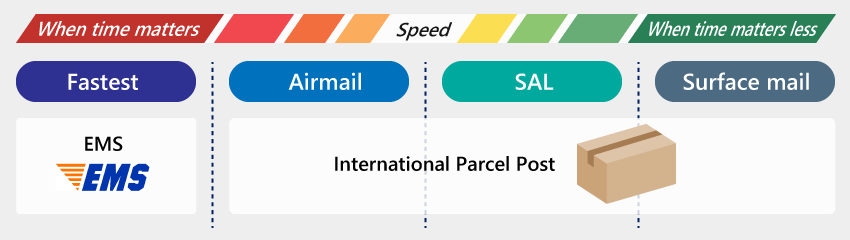
Aside from Japan post you also have your usual private couriers, like DHL, FEDEX, UPS, etc. They are also very expensive, you will have to go to their respective site to see their policies and prices they offer, or at checkout, storefronts usual show the full price of shipping in your country.
Here you will find JP Post's rates and delivery days calculator if you want to get an idea on the estimate of what you are ordering
When it comes to customs, be sure to visit your country's goverment customs website for information on duties and taxes
There are several ways to avoid paying for customs taxes. Additional information can be found here. Be sure to visit the country specific information from the link provided.
#
Agent Types
- Forwarder
- Used in cases when you want to buy goods/Items, but the service or person doesn't ship overseas. You then rely on a forwarder, that will give you a temporary Japanese address to which you can ship the things you need. The forwarder will charge you storage fees + international shipping to send the goods/items to you. You can simply think of this as someone that literally forwards the goods to you, because you don't have a Japanese address of your own.
- Proxy
- Someone acting on your behalf that buys, accepts, and ships the goods to you, unlike a forwarder. Generally, recommended for beginners (especially if you are nervous about buying stuff online), however more expensive. They will charge you the purchase fees for the goods + domestic shipping + international shipping fees + any additional fees as per their policy.
#
Additional Guides
- Types of Merch
- An overall good coverage of all the types of merch out there
- Bootleg Guide
- Bootleg (Fake product) spotting guide
Don't be impulsive.
Read the guide by BuyFag and make informed decisions. It's always a good idea to read the most recent reviews or ask for advice in a related community before making your final decision.
#
Guides
- A Complete Guide by BuyFag
- Bootleg Figure Spotting Guide by Solaris
- Dakimakuras guide
- Fumo Buying guide
- Garage Kit Guide by Muntoe
- Gunpla Guide by Gelgoog Guy
- Gunpla Guide by Layman
- Gunpla Wiki r/Gunpla
- Music Stuff from Japan by Dimsim
#
Info
- Buyfrag Store Digest
- JOSIC
- Gundam Kits Collection
- Gunjap
- r/Anime's legal stream list
- Buying visual novels
- Otaku Calendar
#
Communities
- My Figure Collection
- Anime Deals
- Anime Figures
- Anime Merchandise
- Manga Collectors
- Gundam Forums
- Gunpla
- Dakimakuras R+
#
Retailers
- AmiAmi
- Big in Japan
- Crunchyroll
- Dekai Anime
- Hobby Link
- Hobby Search
- FAKKU Merch R+
- Mandarake
- Otaku Mode
#
Agents
#
Tracker
#
Manga, Anime, OST & Others
- CDJapan Manga Anime OST LN Merch Physical
- Play-Asia Manga Anime OST Merch Physical
- HMV & Books Manga Anime OST Merch Physical
- Qobuz OST Digital
- Ototoy OST Physical
- Mora OST Digital
- Recochoku OST Digital

#
Scanlation
Information and guides pertaining to the world of fan translation, everything from behind-the-scenes looks to tutorials.
#
Communities

#
Raw
- Bilingual Manga
- Hachi Raw R+
- KL Manga R
- Mangaraw Japan R+
- Mangaraw+
- Raw Kuma R
- Sen Manga R+
- We Love Manga | Manga 1000 R
- A-Z Manga R+ Novel Magazine
- Asia Media Blog Novel Magazine
- Book Share Zip R Novel Magazine
- Comic 77 R+
- Comics 888 R Novel Magazine
- DL Raw co R Novel Magazine
- DL Raw net Manga Zip R+ Novel Magazine
- DL Zip R Novel Magazine
- Itazura Neko Novel
- JP DDL R
- Manga Zone Novel
- Raw Cans R+ Magazine
You can use okdebrid, rapidgrab, & newscon to download free & premium files from the file hosters.

#
Resources
- Jaded Network's SFX library
- Japanese SFX
- Manga Fonts Dictionary
- Scanlator School Fonts
- Creative Favrica's Fonts by /MiniSheep/
- CSP Retouch Library
- DK Hanoded Fonts by Sr.Xlr11
You can find a lot more free assests in the Scanner Usage School Server.
- Fascans Redrawing guide Part 1 Part 2
- Rain's Redraw Tutorials
#
Tools

#
NSFW
Everyone has to let off some steam once in a while, we don't judge.
#
Websites
- AnimeID Hentai
- Haho
- Hanime 720p
- Hentai Bar
- Hentai Haven
- Hentai Mama
- Hentai Stream 4K
- Hentai World
- Mucho Hentai Schedule PV
- Oppai 4K
- Rule34
- Hentai Release Schedule
- E-Hentai
- Mangadex of doujins. Everything is uploaded here.
- ExHentai
- Hidden domain of e-hentai that also has more extreme tags.
- nHentai
- Most popular. Decent UI but compresses images
- IMHentai
- Big Library and great search filters.
- Hitomi
- Big Library but difficult to navigate.
- Koushoku
- Has licensed (Fakku/Irodori) stuff.
- Hentaifox
- Fast Updates and English only library.
- Hentai2read
- Combines Chapters of a series into a single entry unlike most sites so good to read doujin series.
- Nyaa Sukebei
- NSFW portion of nyaa.
- Chika Panda
- Archive of stuff removed from E-Hentai due to DMCA complaints. has fakku/irodori stuff.
- nyanpantsu Github
- Wholesome Hentai God List
#
Software
#
Others
- E-HENTAI-VIEW-ENHANCE
Sleezy
- Eza's Image Glutton
Sleezy
- Image Board Enhancer
Sleezy
- Let's panda!
Sleezy
- MALSync Adult
Sleezy
- Manga Loader NSFW
Sleezy
- Manga OnlineViewer
Sleezy
- nhentai helper
Sleezy
- nhentai konnichiwa

#
Communities
A list of other otaku communities to check out based on your specific interests.
#
Forums
#
Discord servers
- Doujin Cafe
- Japanese Language Study Space
- Mangadex
- Manga Piracy
- r/Anime
- r/Manga
- Scanner Usage School Server
- Sitting on Clouds
- SquidBoard
- Tachiyomi
- TheMoeWay
- TypesettingTools
#
Subreddits
- Anime
- Manga
- Manhwa
- Light Novels
- Visual Novels
- Anime Piracy
- Manga Piracy
- Japan Pics
- Japan Life
- Japan Travel
- Learn Japanese
- Vocaloid